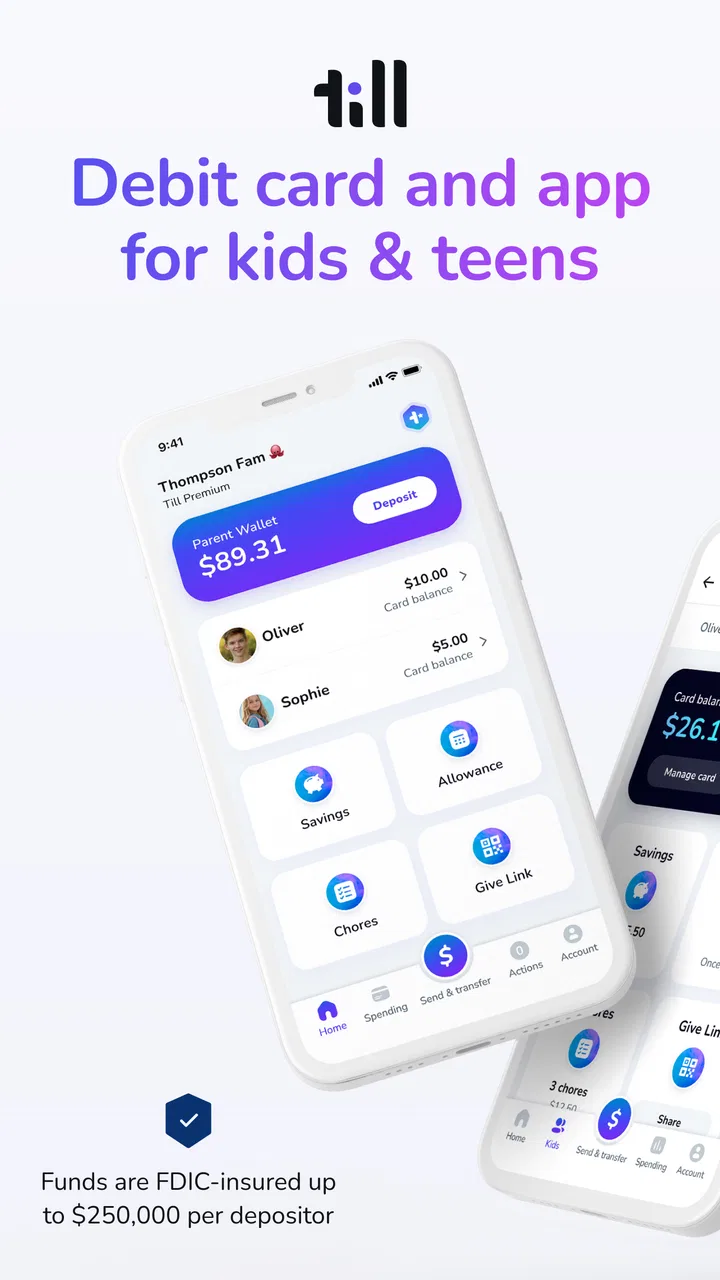
Till: Debit Card for Kids
- 4.5
- Rating
- 100.00K
- Installs
- Free
- Price

 Analysis by App-foxy
Teaching a young person to handle money is difficult when every lesson stays theoretical. Till: Debit Card for Kids approaches the problem through a supervised debit card and a companion finance app, giving kids and teens a way to practise spending while an adult remains involved. I found the central idea more useful than a simple allowance reminder because it connects a real purchase with a conversation about choices, limits, and planning.
Till Financial developed this free finance app for families, and its purpose is easy to understand: help children become more thoughtful spenders through everyday transactions. The app is rated for Everyone, has passed one hundred thousand installs, and holds an average rating of 4.5 from around 2.2 thousand ratings. Those figures suggest a product that has found a clear audience, although they do not replace the need to decide whether its approach suits your family.
Learning through a supervised debit card
The most important capability here is the connection between the child’s spending experience and the parent’s oversight. Instead of handing over cash and hoping the lesson sticks, a family can use the card as a practical training ground. A child sees money leave an available balance after a purchase, while the adult can stay close enough to guide the decision.
You May Also Like

 Blood Strike: 2.5 Anniversary
Blood Strike’s Loadouts Turn Every Drop Into a Tactical Gamble
A close look at Blood Strike’s custom loadouts: how fast access to signature weapons reshapes its battle royale rhythm, rewards preparation, and narrows the gap between fights.

 Pandora - Music & Podcasts
Pandora’s Music Is Easy to Start, but Harder to Recover
Pandora’s strength is its low-effort path from a seed to a station. Its weak spot is how much confidence it asks you to place in connection, setup, and quiet recovery.

 8 Ball Pool
 Is Built on Rivalries, Rematches, and Routine
A close look at the rivalries, rematches, shared routines, and unanswered safety questions that turn a quick pool match into a persistent mobile community.

 Samsung Music
’s Quiet Strength Is Playing What You Already Own
Its reach comes less from spectacle than from dependable access to a personal library. That simplicity is both the app’s strongest retention engine and its ceiling.

 AccuWeather: Weather Radar
AccuWeather Review: A Quick, Clear Forecast for Everyday Decisions
For everyday plans, the best forecast is the one you can understand quickly. AccuWeather makes rain timing, radar, and local conditions easy to act on, with a few trade-offs.

 Hill Climb Racing
Why Hill Climb Racing Still Turns Crashes Into One More Run
A tiny car, a bumpy hill and one more upgrade: Hill Climb Racing keeps resurfacing because its simple chaos makes every near-miss feel personal.
More From Our News Desk



That changes the tone of financial education. A discussion before a purchase can be about whether something is affordable; a discussion afterward can focus on whether it was worthwhile. Neither conversation needs to become a lecture. The useful lesson is often the visible consequence: spending on one thing means having less available for another.
I think this is especially relevant for children who understand money better when they can see and use it. A traditional cash allowance can teach counting, but it becomes less convenient as children start buying things in places where cash is not the normal option. A parent-controlled bank account may offer broader banking tools, yet it can feel like an adult product placed in a child’s hands. Till sits between those approaches, with the card experience designed around gradual independence.
The app is not just a digital wallet in my view. Its value depends on the adult using transactions as teaching moments. If a parent loads money, checks the app occasionally, and never discusses choices, the card may become only another payment method. Used intentionally, it can turn routine spending into repeated practice.
Why this capability matters beyond allowance day
Children often learn the rule “do not spend too much” without learning how to apply it. A supervised debit card makes the rule more concrete. The child has to decide whether to buy now, wait, or keep money for something else. That small decision is where budgeting becomes a habit rather than an abstract instruction.
There is also a useful middle ground between complete freedom and complete restriction. Parents do not need to hand over an unrestricted adult account simply to let a teenager pay for lunch or a small purchase. At the same time, the child gets more responsibility than they would from asking an adult for cash every time.
The effect will vary by age. A younger child may need help understanding that a card is connected to real money, not an endless source of funds. A teenager may benefit more from reflecting on patterns: frequent small purchases, impulse buying, or failing to reserve money for a planned expense. The same product can therefore support different conversations, but the parent has to adjust the level of involvement.
What using it feels like in daily life
I would begin by treating Till as a shared routine rather than a set-and-forget service. Before giving a child spending responsibility, I would agree on what the money is for, how often we review activity, and what happens when the balance is low. The app then becomes a reference point for those agreements instead of a source of surprises.
A realistic example is a teenager who receives money for school lunches and occasional personal spending. On Monday, they may use the card for lunch and later consider buying a drink or snack. With a supervised card, the second decision is no longer invisible. The teenager can see that the extra purchase affects what remains for the week, and the parent can ask whether the choice fits the plan without paying for every item directly.
That workflow offers a non-obvious advantage: it separates the act of spending from the embarrassment of asking for money. A young person can make ordinary purchases independently, while the adult still has a framework for guidance. For families trying to build confidence, that is more constructive than either constant approval or total hands-off control.
I would also use a short weekly review, not a daily interrogation. Look at the recent activity together and ask the child to identify one purchase they would make again and one they might reconsider. This keeps the focus on judgment rather than surveillance. It also helps parents notice whether the child understands the balance or is simply tapping the card without thinking.
Practical questions families should settle first
One question many parents will have is whether the app replaces a normal bank account. I would not treat it that way. Its strongest role is supervised spending practice for kids and teens, not a complete financial home for an entire household. Adults who need extensive banking, investing, bill payment, or account-management tools should look at a conventional financial service instead.
Another question is whether a child can use it without much parental involvement. Technically, a child may be able to make routine purchases, but the educational benefit is weaker if the adult never checks in. The product is most convincing when both sides use it: the child spends, and the parent turns the result into feedback.
It is also worth thinking about the child’s maturity before issuing the card. A teenager who already understands limits may need less supervision, while a younger child may require clear boundaries and frequent explanations. The app can support a gradual handoff of responsibility, but it cannot decide when a child is ready.
The current version is 162.41.0, and the app supports devices running Android 7.0 or later. That makes it accessible to many Android users, including families keeping an older phone in service. Still, I would check the device experience before making it central to a child’s routine, particularly if the family depends on an older handset or an unreliable connection.
The best scenario for Till
The strongest use case is a family that wants to move from cash allowance to controlled digital spending without giving up parental guidance. Imagine a middle-school student who has started buying snacks after school and wants more independence. The parent can use the card as a defined weekly budget, then review the choices together at a calm time.
In that situation, the card does three jobs at once. It gives the child a practical way to pay, gives the parent a way to stay involved, and creates evidence for a conversation. The child is not merely told to budget; they can see the result of each decision. The parent is not forced to approve every purchase; they can coach through patterns over time.
I also see value for families with a teenager preparing for more independence. The card can be part of a staged approach: first, the adult reviews spending frequently; later, the teenager explains their own plan; eventually, the adult may need to intervene less often. This progression is more useful than treating financial responsibility as something that begins all at once.
A less obvious scenario is using the app after a mistake. If a child spends too much on an impulse purchase, immediately replacing the money teaches very little. Reviewing what happened and allowing the consequence to remain visible can create a stronger lesson, provided the family has agreed that essential needs will not be put at risk. The app’s usefulness is therefore not only in preventing mistakes but in making manageable mistakes discussable.
Where the tradeoffs become noticeable
The biggest tradeoff is that convenience depends on family communication. Parents who want a completely automatic allowance system may find the experience less satisfying. A card can display activity, but it does not magically teach priorities. The adult still has to set expectations, notice problems, and decide how much freedom is appropriate.
There is also a tension between supervision and privacy. A child may appreciate having a payment method but dislike feeling watched. I would explain clearly what the parent will review and why, rather than presenting oversight as a hidden control. For older teens especially, agreeing on a review rhythm can preserve trust better than checking every transaction without discussion.
Cost is another point to examine. The app is free to download, but it includes in-app purchases ranging from $7.99 to $79.00 per item. That means families should consider the complete cost of the service before committing, rather than assuming that a free download means every part of the experience costs nothing. The right comparison is the total value of the supervision and learning tools against other youth banking or allowance options.
Families should also compare the service with their existing bank. A bank account connected to a parent’s established financial setup may be better for households that prioritize traditional banking features, broader account access, or keeping all money management in one place. Cash may remain the better choice for a young child who is still learning basic counting and has little need for card payments.
Another limitation is that a debit card can make spending feel frictionless. Tapping a card is easier than handing over counted cash, so a child may lose some of the physical sense of money leaving their possession. I would counter that by making the balance review part of the routine and by asking the child to plan one upcoming expense before spending freely.
How it compares with familiar alternatives
Compared with cash, Till offers greater relevance for modern purchases and a clearer way for parents to stay involved from a distance. Cash remains easier for demonstrating denominations and immediate subtraction, but it is less convenient for many everyday transactions. The best choice depends on whether the child’s main lesson is basic money handling or independent digital spending.
Compared with a standard bank debit card, Till feels more focused on the parent-child learning relationship. A conventional account may be more suitable once a teenager needs a wider set of financial services. Till makes more sense when the immediate goal is a controlled introduction to spending rather than full banking independence.
Compared with an allowance-tracking app that does not involve a card, this product connects the plan to actual purchases. That can make lessons more realistic, but it also raises the stakes: the child is making real spending decisions, not merely marking an imaginary allowance as complete. Parents should choose it when they are ready for that responsibility, not simply because a digital interface looks convenient.
Who will gain the most from it
I would recommend Till most readily to parents of kids or teens who are ready for limited independence and who learn well from immediate, practical feedback. It is particularly suitable when a family wants to replace ad hoc cash handouts with a repeatable routine while keeping the adult involved.
It may also suit parents who disagree with giving a teenager a fully independent bank card but still want to prepare them for real-world spending. The supervised structure can provide a gradual transition, especially when the family agrees in advance on budgets, review habits, and the meaning of an avoidable purchase.
I would be more cautious for families seeking a comprehensive banking platform, families unwilling to discuss spending, or children who are not yet ready to understand that a card represents limited funds. In those cases, cash, a simpler allowance method, or a more established banking product may be a better fit.
The app is free to start, and its Everyone rating makes it approachable for a broad family audience, but the right decision depends less on age alone than on readiness. A mature child with a small, clearly explained budget may use it well; an older child who ignores every limit may need a different lesson before receiving card access.
My final view after using the approach
Till’s strongest idea is simple but meaningful: let children practise spending with a debit card while an adult remains close enough to teach. I like it because it turns financial education into something observable and repeatable. The child makes choices, the balance reflects those choices, and the family has a natural starting point for a conversation.
That strength is also the condition for success. This is not a substitute for parenting, and it is not automatically better than cash or a regular bank account. Its value appears when the family uses the card deliberately, reviews decisions without turning every purchase into a conflict, and increases independence as the child demonstrates good judgment.
With around 318 written reviews and a 4.5 average, the app has earned a positive reception, while its one hundred thousand-plus installs show that the concept is reaching real families. I would choose it for a household looking for a practical bridge between allowance and independent spending. If that is your goal, the supervised-card model is the feature that makes Till worth considering.
FAQs for Till: Debit Card for Kids
01What is Till: Debit Card for Kids, and how does it work?
Till is a family-focused money management app designed to help children learn about spending, saving, and earning under a parent’s supervision. Parents typically create and manage the account, set up allowances or payments, monitor transactions, and control the child’s debit card activity. The exact features, availability, and account requirements may vary depending on location and the current version of the service.
02What age is Till suitable for, and does a parent need to sign up?
Till is intended for children and teenagers, but it is not generally an independent banking product for minors. A parent or legal guardian usually needs to open the family account, provide the required information, and approve the child’s access. Before downloading, check the current age limits, identity verification rules, supported countries, and whether both the parent and child need compatible devices.
03Can parents control spending and monitor transactions with Till?
One of Till’s main purposes is to give parents visibility and control over a child’s spending. Depending on the plan and region, parents may be able to review transactions, manage allowances, send money, establish spending rules, or pause card access. Controls can differ by account type, merchant category, and app update, so parents should review the latest terms before relying on the card for everyday expenses.
04Are there fees or limits associated with the Till debit card?
Potential costs may include subscription charges, card replacement fees, ATM or out-of-network withdrawal fees, transaction limits, or restrictions on certain types of purchases. Pricing and limits can change according to the user’s country, selected plan, and promotional offer. Before signing up, carefully examine the in-app pricing information and official terms, especially if you expect frequent card use or cash withdrawals.
05Is Till safe for children to use, and what happens if the card is lost?
Till is designed with parental oversight, which can make it safer than giving a child unrestricted access to a traditional payment card. Parents should still discuss responsible spending, protect login credentials, and enable available security features such as notifications or card controls. If the card is lost or stolen, it should be frozen immediately in the app and reported through Till’s support process.
Pros
- Parents can set spending limits and receive real-time purchase notifications.
- Kids learn budgeting through a controlled
- practical payment experience.
- Card controls can be managed conveniently from the parent’s phone.
- Useful for allowances
- chores
- and planned everyday spending.
- Designed to reduce the need for children to carry cash.
Cons
- Availability and features may vary depending on the country and plan.
- Some features require a paid subscription or additional fees.
- Younger children may still need guidance to use the card responsibly.
- A phone or internet connection may be needed for account management.
- Not every merchant or transaction type may support the card.

Till: Debit Card for Kids
Gallery